
Free Temporary Number For AMAZON WEB SERVICES Verification
+1 20-22-98-8730
|
Waiting for SMS messages from AMAZON WEB SERVICES...
|
Need a Reliable Number?
Our free numbers are shared and may become unavailable. For consistent SMS reception, we recommend a dedicated number. Alternatively, refresh this page for a different free number.
Order a Number
How to Authenticate Your AMAZON WEB SERVICES Account with a Virtual Number?
Receive-SMS.com delivers dedicated virtual numbers for reliable, long-term AMAZON WEB SERVICES verification and OTP reception.
Long-lasting, Not Transient
Receive-SMS.com provides a lasting, dedicated number, ensuring you'll always receive your AMAZON WEB SERVICES verification codes, today and tomorrow.
Multiple Platform Support
Your dedicated number is compatible with AMAZON WEB SERVICES and multiple other platforms, offering a versatile solution for all your OTP needs.
Cost-Effective
Choose the yearly plan on Receive-SMS.com for maximum savings. A dedicated number does away with the need for multiple purchases across different services.
How to Create AMAZON WEB SERVICES Account with a Virtual Number
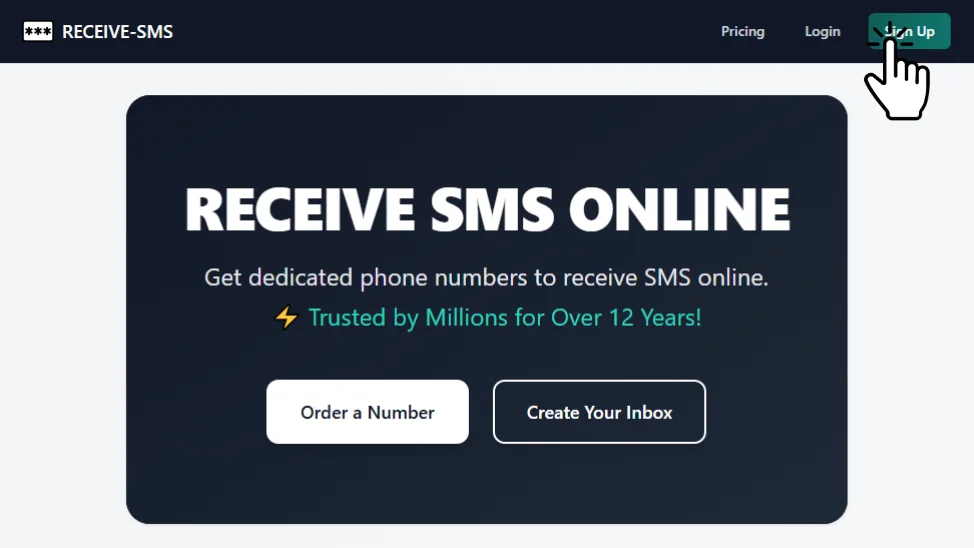
Step 1: Go to Receive-SMS.com and Click Sign Up
Visit Receive-SMS.com and click on "Sign Up."
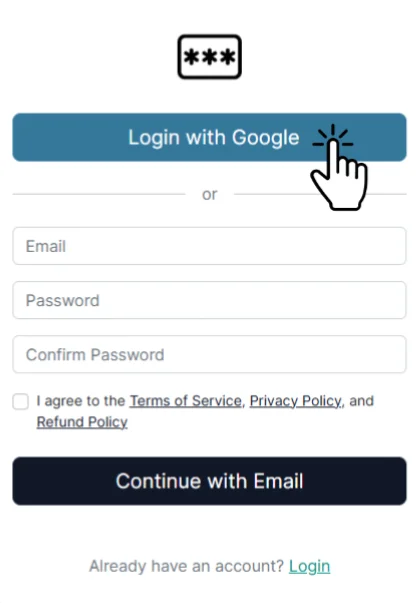
Step 2: Log in with Google or Enter Email Information
Log in using Google or enter your email information to sign up.
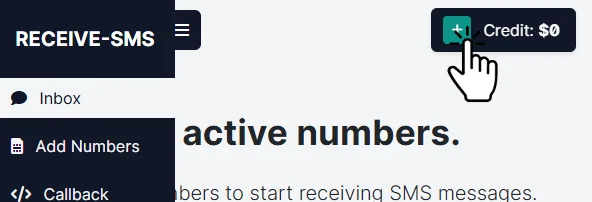
Step 3: Click the Plus Button to Top Up
Click the plus button on the top right to add credit to your account.
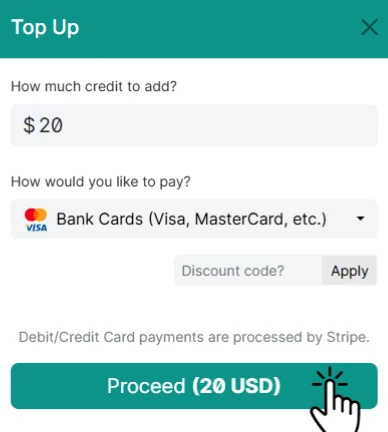
Step 4: Choose a Payment Method and Add Credit
Select your favorite payment method and add some credit to your Receive-SMS.com balance.
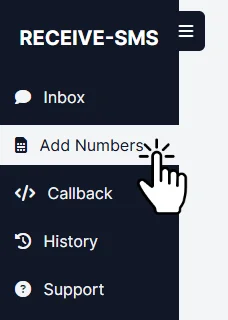
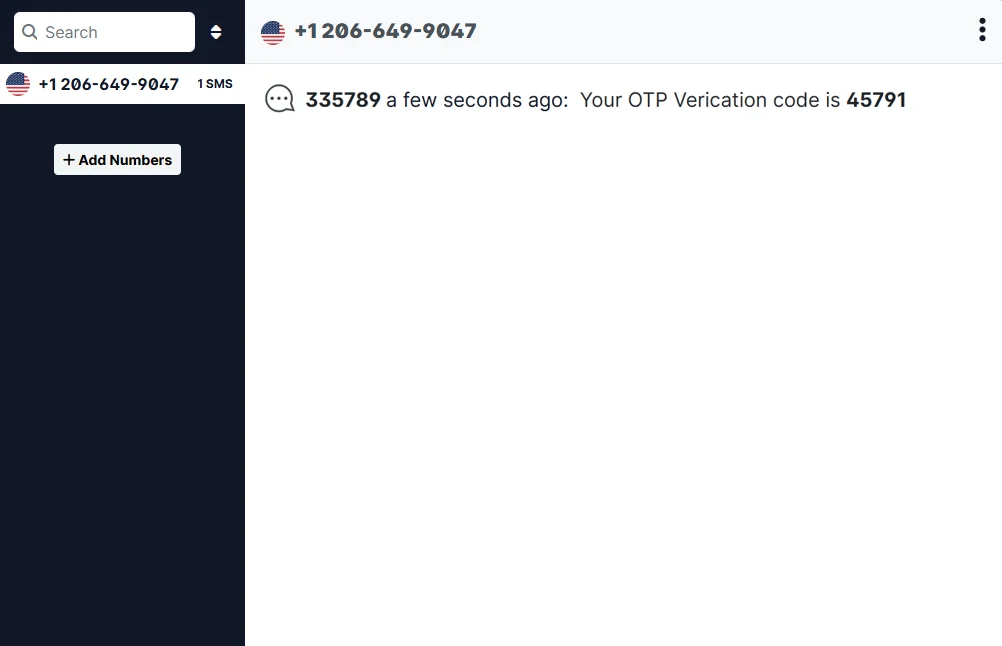
Step 5: Click "Add Numbers" in the Sidebar Menu
In the sidebar menu, click "Add Numbers."
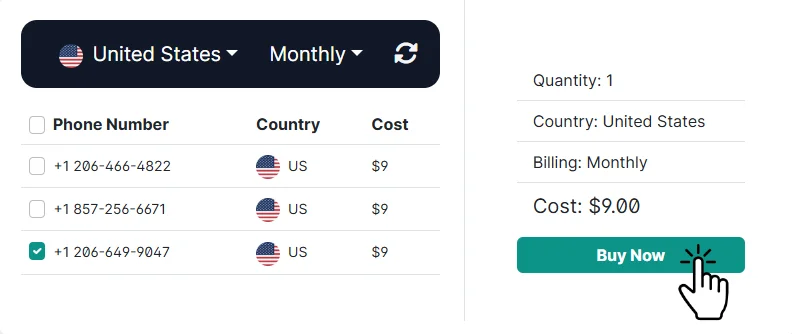
Step 6: Choose a Number and Click "Buy Now"
Select a number from the list and click "Buy Now."
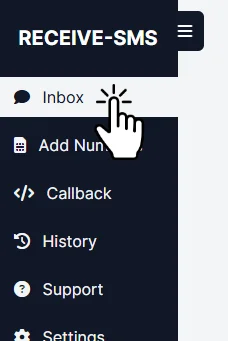
Step 7: Click "Inbox" in the Sidebar Menu
Go to the "Inbox" section from the sidebar menu.
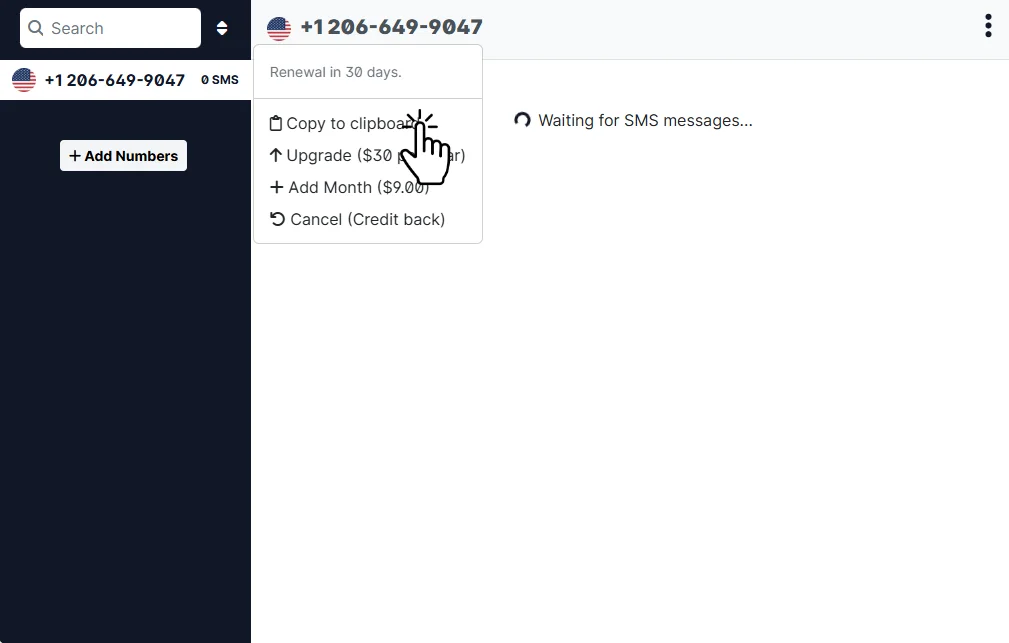
Step 8: Copy the Number to Your Clipboard
Copy the purchased number to your clipboard.
Step 9: Enter the Number in the AMAZON WEB SERVICES Registration Form
Paste the virtual number into the AMAZON WEB SERVICES registration form.
Step 10: Check Receive-SMS Inbox for the Verification Code
Return to the Receive-SMS inbox to see the verification code and enter it in AMAZON WEB SERVICES.
Alternative AMAZON WEB SERVICES Verification Methods
Free Temporary Numbers (SignupFast.org)
If you need a quick, one-time solution for AMAZON WEB SERVICES verification, SignupFast.org offers free temporary numbers. Here's what you should know:
Advantages
- ✓ Completely free to use
- ✓ No registration required
- ✓ Multiple country options
Limitations
- ✗ Numbers are shared with other users
- ✗ Numbers may be removed at any time
Best For
- • Testing purposes
- • One-time verifications
- • Non-critical accounts
- • Temporary use only
Budget-Friendly Paid Option (VerifyPlease.com)
VerifyPlease.com offers a middle-ground solution with temporary numbers starting at just $0.2 per verification. Here's what they provide:
Advantages
- ✓ Fresh, unused numbers
- ✓ Pay only for successful verifications
- ✓ Quick activation
- ✓ 24/7 support
Pricing
- $ Pay-as-you-go
- $ Starting from $0.2 per number
- $ No subscription required
Best For
- • Multiple verifications
- • Reliable service needs
- • Short-term projects
- • Budget-conscious users
Comparison of Virtual Number Options for AMAZON WEB SERVICES
| Feature | Receive-SMS.com | SignupFast.org | VerifyPlease.com |
|---|---|---|---|
| Cost | From $2.5/month | Free | From $0.2/number |
| Success Rate | 99%+ | ~30% | ~90% |
| Number Type | Dedicated | Shared | One-time |
| Best For | Long-term use | Testing | Short-term |
FAQ About AMAZON WEB SERVICES Verification
Why Does AMAZON WEB SERVICES Require a Phone Number?
AMAZON WEB SERVICES requires phone number verification for several important reasons:
- To Deter spam and automated accounts
- To Boost platform security
- To Enable two-factor authentication
- To help users discover contacts who also use $service_name
- To Comply with anti-abuse regulations
Can You Have AMAZON WEB SERVICES Without a Phone Number?
While you can't create a AMAZON WEB SERVICES account without any phone number, you have several privacy-friendly options. Explore your options in our guide about which services accept virtual numbers for OTP:
- Utilize a dedicated virtual number from Receive-SMS.com
- Obtain a temporary number from VerifyPlease.com
- Try free services like SignupFast.org
- Use a secondary physical SIM card
How to Get a Free Number for AMAZON WEB SERVICES?
There are multiple methods to get a free number for AMAZON WEB SERVICES verification. For a comprehensive overview, check out our guide on getting free temporary virtual numbers:
Free Services:
- SignupFast.org - Completely free but less reliable
- Free trial offers from virtual number providers
- Community-shared numbers (not recommended)
Paid Alternatives:
- Receive-SMS.com - Most reliable ($2.5/month)
- VerifyPlease.com - Pay per use ($0.2/verification)
What Happens If I Lose Access to My AMAZON WEB SERVICES Number?
If you can't use your verification number, you have multiple choices:
With a Dedicated Number:
- Continue using the same virtual number
- Get codes through your provider's platform
- Access SMS history in your account
Without Number Access:
- Employ email recovery if configured
- Reach out to AMAZON WEB SERVICES support
- Use two-factor authentication recovery
AMAZON WEB SERVICES Verification Related Blog Posts