

Free Temporary Number For GOOGLE PAY Verification
+1 21-04-10-7247
|
Waiting for SMS messages from GOOGLE PAY...
|
Need a Reliable Number?
Our free numbers are shared and may become unavailable. For consistent SMS reception, we recommend a dedicated number. Alternatively, refresh this page for a different free number.
Order a Number
How to Validate Your GOOGLE PAY Account with a Virtual Number?
Receive-SMS.com provides dedicated virtual numbers for reliable, long-term GOOGLE PAY authentication and OTP reception.
Dedicated, Not Short-term
Receive-SMS.com offers a lasting, dedicated number, making sure you'll always receive your GOOGLE PAY verification codes, now and in the future.
Multiple Platform Support
Your dedicated number functions with GOOGLE PAY and various other platforms, delivering a adaptable solution for all your OTP needs.
Economical
Opt for the yearly plan on Receive-SMS.com for best value. A dedicated number removes the need for multiple purchases across different services.
How to Create GOOGLE PAY Account with a Virtual Number
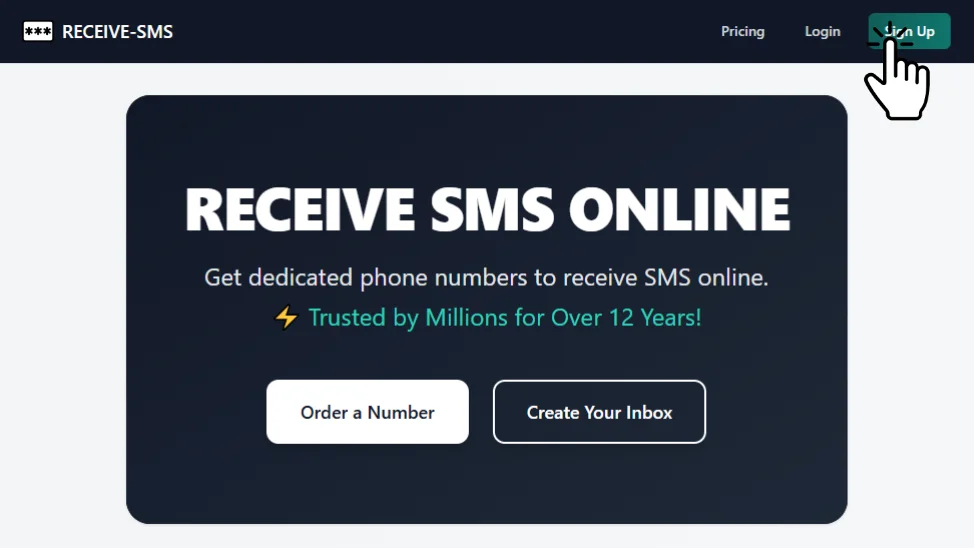
Step 1: Go to Receive-SMS.com and Click Sign Up
Visit Receive-SMS.com and click on "Sign Up."
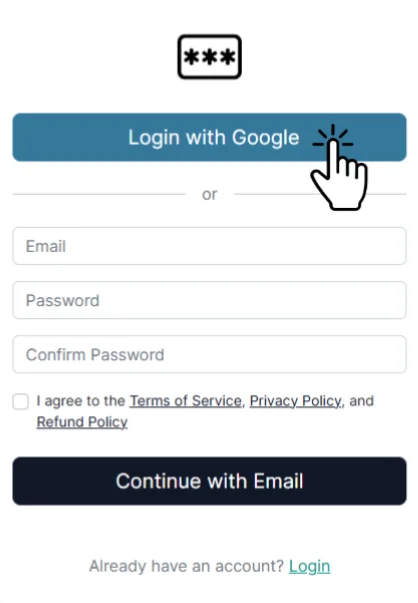
Step 2: Log in with Google or Enter Email Information
Log in using Google or enter your email information to sign up.
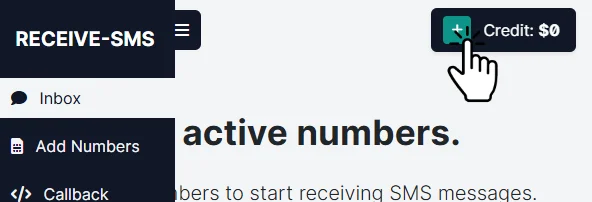
Step 3: Click the Plus Button to Top Up
Click the plus button on the top right to add credit to your account.
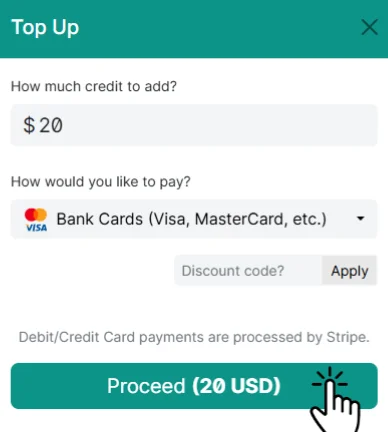
Step 4: Choose a Payment Method and Add Credit
Select your favorite payment method and add some credit to your Receive-SMS.com balance.
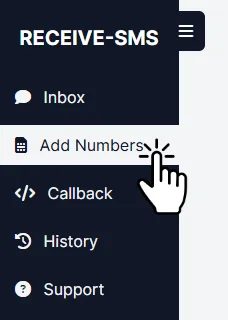
Step 5: Click "Add Numbers" in the Sidebar Menu
In the sidebar menu, click "Add Numbers."
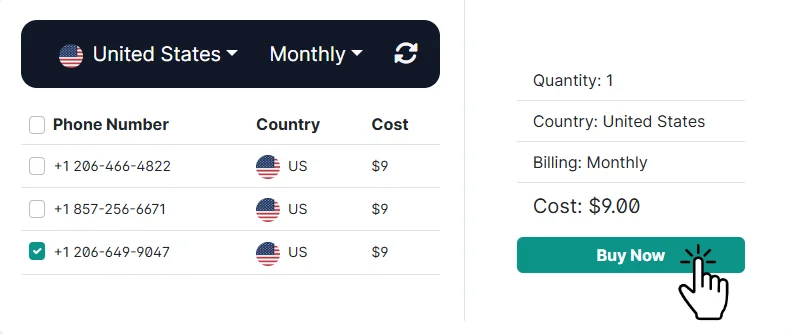
Step 6: Choose a Number and Click "Buy Now"
Select a number from the list and click "Buy Now."
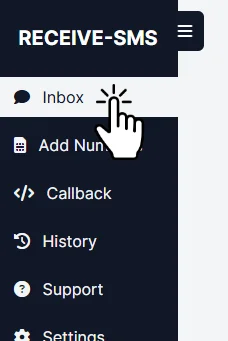
Step 7: Click "Inbox" in the Sidebar Menu
Go to the "Inbox" section from the sidebar menu.
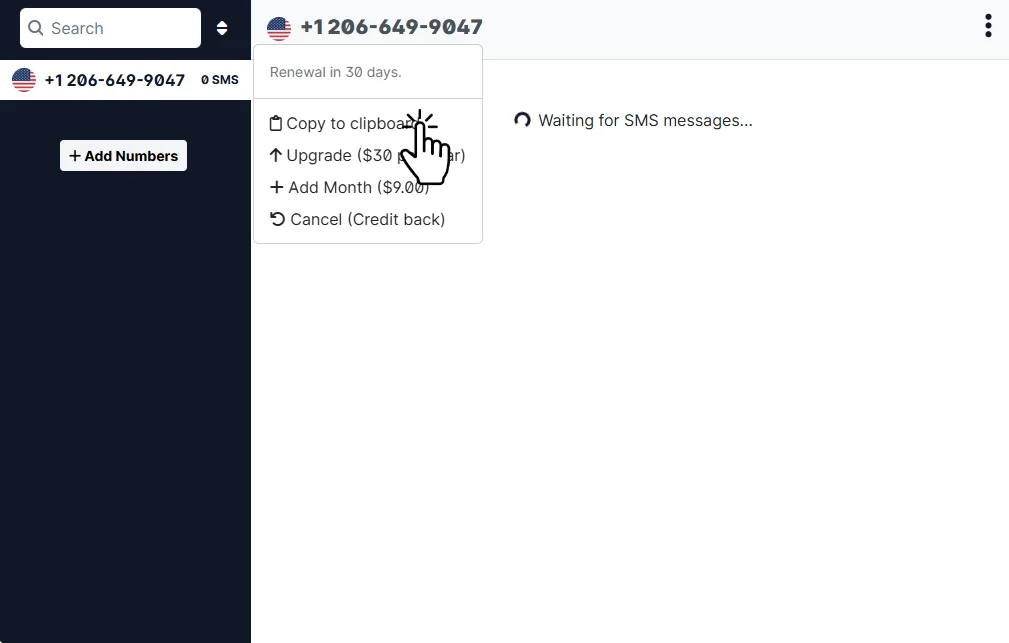
Step 8: Copy the Number to Your Clipboard
Copy the purchased number to your clipboard.
Step 9: Enter the Number in the GOOGLE PAY Registration Form
Paste the virtual number into the GOOGLE PAY registration form.
Step 10: Check Receive-SMS Inbox for the Verification Code
Return to the Receive-SMS inbox to see the verification code and enter it in GOOGLE PAY.
Alternative GOOGLE PAY Verification Methods
Free Temporary Numbers (SignupFast.org)
If you need a quick, one-time solution for GOOGLE PAY verification, SignupFast.org offers free temporary numbers. Here's what you should know:
Advantages
- ✓ Completely free to use
- ✓ No registration required
- ✓ Multiple country options
Limitations
- ✗ Numbers are shared with other users
- ✗ Numbers may be removed at any time
Best For
- • Testing purposes
- • One-time verifications
- • Non-critical accounts
- • Temporary use only
Budget-Friendly Paid Option (VerifyPlease.com)
VerifyPlease.com offers a middle-ground solution with temporary numbers starting at just $0.2 per verification. Here's what they provide:
Advantages
- ✓ Fresh, unused numbers
- ✓ Pay only for successful verifications
- ✓ Quick activation
- ✓ 24/7 support
Pricing
- $ Pay-as-you-go
- $ Starting from $0.2 per number
- $ No subscription required
Best For
- • Multiple verifications
- • Reliable service needs
- • Short-term projects
- • Budget-conscious users
Comparison of Virtual Number Options for GOOGLE PAY
| Feature | Receive-SMS.com | SignupFast.org | VerifyPlease.com |
|---|---|---|---|
| Cost | From $2.5/month | Free | From $0.2/number |
| Success Rate | 99%+ | ~30% | ~90% |
| Number Type | Dedicated | Shared | One-time |
| Best For | Long-term use | Testing | Short-term |
FAQ About GOOGLE PAY Authentication
Why Does GOOGLE PAY Require a Phone Number?
GOOGLE PAY requires phone number verification for several important reasons:
- To Prevent spam and automated accounts
- To Enhance platform security
- To Facilitate two-factor authentication
- To help users find contacts who also use $service_name
- To Comply with anti-abuse regulations
Can You Have GOOGLE PAY Without a Phone Number?
While you can't create a GOOGLE PAY account without any phone number, you have several privacy-friendly options. Explore your options in our guide about which services accept virtual numbers for OTP:
- Use a dedicated virtual number from Receive-SMS.com
- Obtain a temporary number from VerifyPlease.com
- Try free services like SignupFast.org
- Use a secondary physical SIM card
How to Get a Free Number for GOOGLE PAY?
There are several ways to get a free number for GOOGLE PAY verification. For a comprehensive overview, check out our guide on getting free temporary virtual numbers:
Free Services:
- SignupFast.org - No cost but less reliable
- Free trial offers from virtual number providers
- Community-shared numbers (not recommended)
Paid Alternatives:
- Receive-SMS.com - Highly dependable ($2.5/month)
- VerifyPlease.com - Pay per use ($0.2/verification)
What Happens If I Lose Access to My GOOGLE PAY Number?
If you can't use your verification number, you have several options:
With a Dedicated Number:
- Continue using the same virtual number
- Get codes through your provider's platform
- View SMS history in your account
Without Number Access:
- Employ email recovery if configured
- Reach out to GOOGLE PAY support
- Utilize two-factor authentication recovery
GOOGLE PAY Verification Related Blog Posts